Slack – Where collaboration meets your Salesforce context
8.5.2026
Starting its exponential growth from the Silicon Valley in the mid 2010s, Slack has since become the standard team collaboration tool used by businesses and organisations all over the world. Slack’s focus is on bringing different people, teams, systems and now also agents together to facilitate more insightful discussions. Doing so will eliminate the disconnection and siloing of information and workflows: A major challenge that many businesses are struggling with today. Salesforce acquired Slack in 2021 and has since made it a core component of the Salesforce 360 ecosystem.
What is Slack?
Slack is an AI powered business communication and collaboration tool, sharing much of the same core functionalities than Teams for example. On Slack you can communicate with your organisation’s members privately via DMs, or you can create channels around specified subjects where channel members can discuss and share information. Channels are further organised to threads keeping the discussions structured, and they can have Canvases which display important information and documents related to the discussion. You can also start huddles which are live video conversations inside a channel.
What makes Slack special is the vast integration library which allow connecting different systems to support daily conversations. Another strong feature is the Slackbot – your AI powered personal assistant. It can for example search for files, set reminders, create Action Points to your next meeting and even automatically respond to frequently asked questions with personalised messages. Slackbot learns from your previous discussions, so it gets better with time and learns to adapt your style of work! In addition to Slackbot you can deploy other use-case specific Agentforce agents to perform actions using your Salesforce data as context straight from the chat interface.
Slack can be used as standalone product, but having Slack as part of your Salesforce CRM is where the functionalities can really shine.
How can Sales Cloud for Slack support your Sales Process?
Sales Cloud for Slack is an app that you can install to your Slack workspace from the official Slack App Directory. It helps your sales team to work on deals without having to toggle between the systems.
You can create a sales channel that connects directly to your Opportunity and Account either straight from Slack or from Salesforce. The creation of sales channels can also be automated for example based on an Opportunity’s status update, automatically adding all the relevant persons to the discussion. You can configure channels for every UI enabled Salesforce standard or custom object.
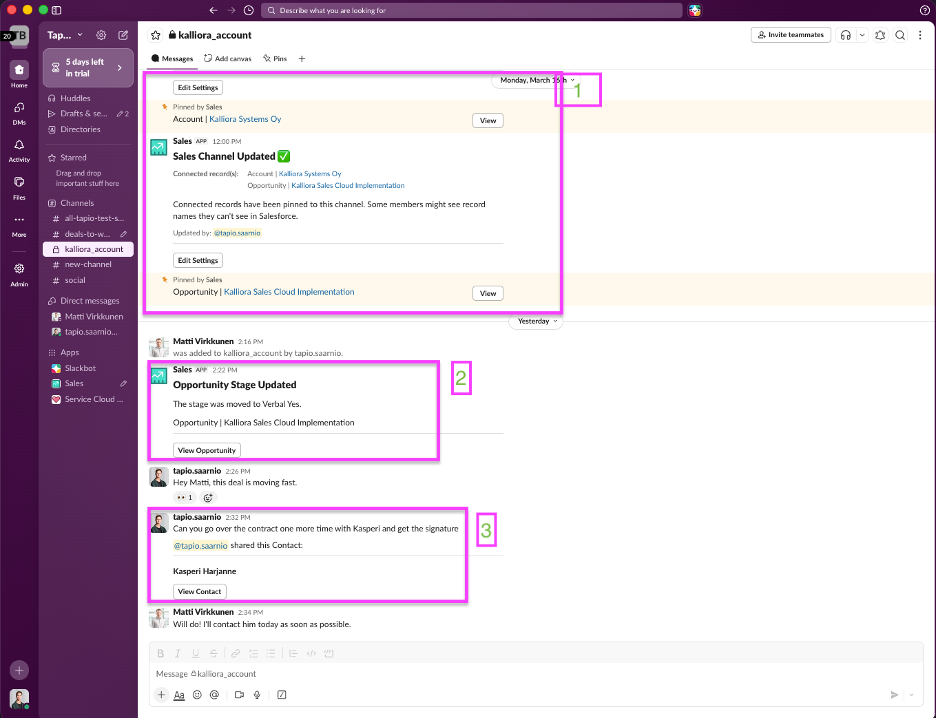
Image 1: Example of Slack UI
Image 1 explained:
- Here you can see the Salesforce Accounts and Opportunities information that is always pinned on top of the chat
- Salesforce automatically pushes updates made to the record as chat messages and your channel members will receive notifications about these updates.
- Here a user shares a Contact record from Salesforce, calling other channel members to action.
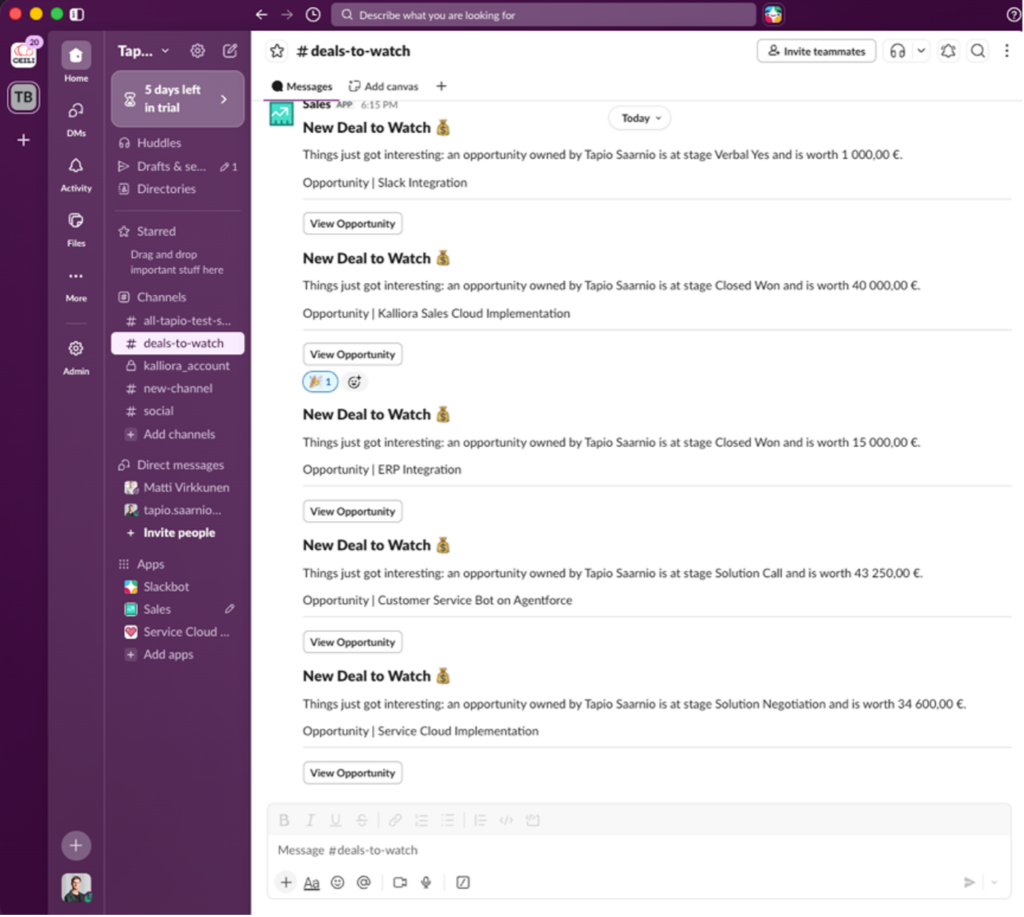
Sales Cloud for Slack also comes with built-in channels like “Deals to Watch” and “Deals Won” to help your Sales Team stay up to date with high-priority actions happening in the sales pipeline. There’s also a possibility to create custom channels according to your needs.
Image 2: Example of Slack’s built-in channels
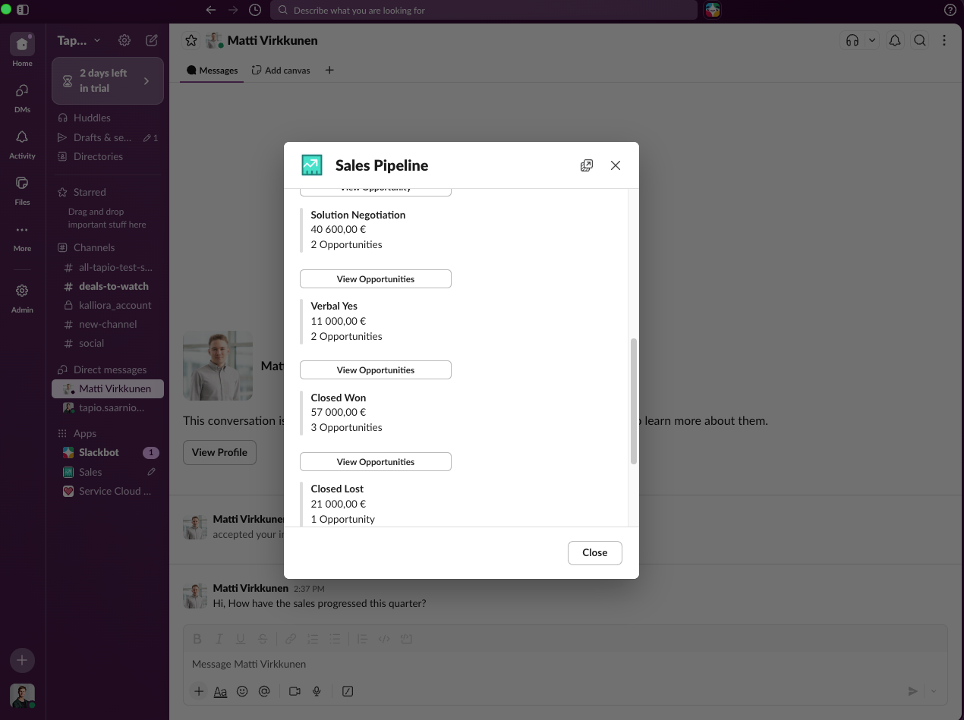
Sales Cloud for Slack comes with many productivity-boosting quick commands. In the Image 3 a Sales Representative is checking their own personal Sales Pipeline with the /sales-pipeline command.
Image 3: Sales Representative is checking their own personal Sales Pipeline
All information displayed in Slack respect your Salesforces security and visibility settings, maintaining trust and security between the systems.
Connecting your Salesforce data to where your everyday discussions are happening will bring several benefits:
- Every discussion participant act based on the same up to date data, removing confusion, allowing faster and more accurate responses and decision-making.
- Instead of multiple spread-out discussions, there is one centralised and easily findable discussion, making sure that no information is lost.
- Removes the need for duplicate work and context switching that kills productivity.
- Discussion participants can easily interact with Agentforce agents as part of the chat adding more insights to the conversation.
What other Slack X Salesforce apps are there?
Described above are just some of the many features of the Sales Cloud for Slack app.
In the Slack App Directory there are also other Salesforce related apps such as:
- PRM for Slack – Collaborate with your business Partners
- Service Cloud for Slack – Collaborate and help solve cases faster with your Customer Service Team
- Marketing Cloud Account Engagement for Slack – Automate and manage marketing tasks
- CRM Analytics for Slack – Easy access to your analytics from Slack
- Financial Services Cloud for Slack – Stay on top of client interactions and financial deals
Interested? Salesforce apps are easy to use and configure as part of your Slack environment. We here at Ceili are happy to discuss how Slack could be used to better facilitate discussions related to your business!
Read more

Salesforce Flex Credits: What Are They and How Are They Used?
Salesforce licensing is changing. Alongside the traditional seat-based model, Salesforce is increasingly introducing consumption-based pricing, where costs depend more directly on what is actually done

Ceili Summer ’26 Release Notes
Intro Here is a traditional Ceili’s summary of the upcoming new features and changes in Salesforce’s Summer ’26 release. Salesforce releases an update package three

Helvar’s marketing covers the entire customer lifecycle with Salesforce Marketing Cloud
Helvar is a Finnish technology company that develops intelligent lighting solutions by combining lighting, data, and automation. The goal is to improve energy efficiency, the
Salesforce®, Sales Cloud®, and others are trademarks of salesforce.com, inc., and are used here with permission.